Guide
How to Save Prompts in Perplexity
Perplexity keeps your signed-in sessions in History, and it has custom instructions, Projects and, for its Computer mode, skills. For an ordinary search, its help centre describes no list of saved prompts. This guide shows what each built-in feature holds, and how to keep the research prompts you run again and again.
Last updated: October 10, 2026
What Perplexity keeps, and how you find it again
When you are signed in, a conversation is stored on the History page and normally stays there until you delete it. Perplexity now calls a conversation a session; it used to be a thread. History has a search by keyword or title, and Ctrl+K on Windows or Cmd+K on a Mac opens that search from wherever you are.
Some sessions do not last. Perplexity says a session can be temporary and expire when you attach a file or use a connector. Signed out, a session disappears after 14 days, and an incognito one after 24 hours. And what you find again is the conversation, with the prompt somewhere inside it.
The built-in options, and what each is for
- Custom instructions, in the personalization settings, are a free-text field for your preferences, interests and style. They are about you, for every query.
- Projects, which were called Spaces until July 2026, hold conversations, files and their own instructions of up to 8,000 characters. Good for one subject you keep coming back to.
- Skills belong to Computer, Perplexity’s agent mode: each one gives Computer a method for a kind of task, and it starts when a request matches.
- Shortcuts, saved prompts called with a slash, are a feature of Comet, Perplexity’s browser. In the web app’s settings, the Shortcuts page now says they have moved to Skills.
For an ordinary search in the web app, Perplexity’s help centre describes no place to keep a prompt and call it back.
Save a prompt from the Perplexity message box
- Install PromptTray from the Chrome Web Store and open Perplexity. You do not need an account: prompts are saved in your browser, and signing in later adds sync and a backup.
- Type or paste the prompt in the message box. A Save button appears in the box as soon as there is text.
- Press Save. PromptTray’s panel opens with the prompt filled in and a title taken from its first line. Shorten the title, pick a category, add tags if you want them, and press Save Prompt.
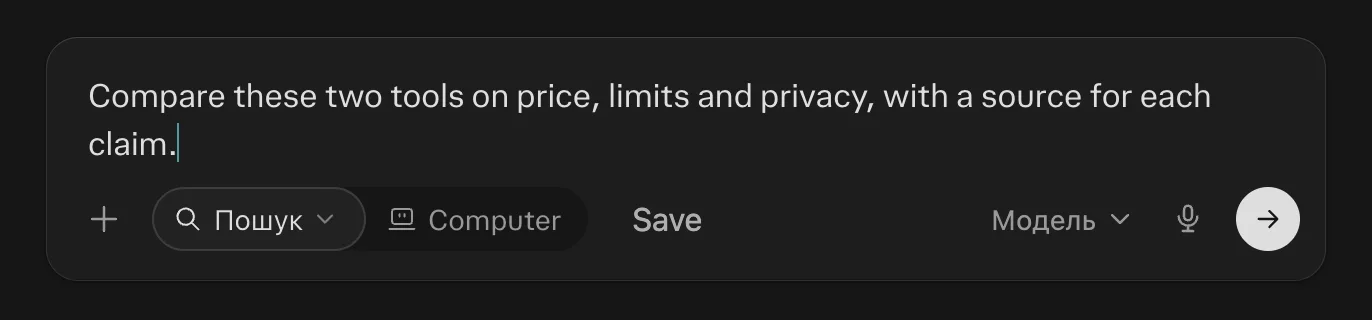
To use it again, press Control Shift K in any chat. Spotlight opens over the page: type a few letters of the title and press Enter. The prompt is in the message box, and nothing is sent until you send it.
Prompts worth saving for Perplexity
Research prompts repeat more than most: the question changes and the way you want it answered does not.
- Compare with sources: “Compare {option A} and {option B} on {criteria}. Give a source for each claim, and say where the sources disagree.”
- What changed recently: “What has changed about {topic} in the last {period}? List the changes by date, each with its source.”
- Find the original source: “Find the original source for this claim: {claim}. Say who published it first and whether later reports changed it.”
- Brief me before a call: “I am meeting {company} about {subject}. Summarize what they do, their last three announcements, and two questions worth asking.”
The words in curly braces are variables: PromptTray asks for them in a short form each time you insert the prompt. The guide to organizing AI prompts has the rules for titles, categories and tags.
If Perplexity is not the only AI app you use
The same library opens in 21 other apps, with the same shortcut. There is a guide like this one for ChatGPT, Claude, Gemini and Grok, and one on keeping one library across AI apps.
What this page says about Perplexity comes from Perplexity’s own pages, read on October 10, 2026: sessions and History, sessions that expire, account settings, Projects, Spaces becoming Projects, history search, skills, Comet shortcuts. Apps change, so check there if something here looks out of date.
FAQ
Does Perplexity have saved prompts?
Not for an ordinary search in the web app, going by its help centre in October 2026. Its Comet browser has Shortcuts, and Computer has skills. Custom instructions and Projects hold standing instructions, not a list of prompts.
Where are my old Perplexity threads?
On the History page, if you were signed in: they normally stay until you delete them, though Perplexity says a session with an attached file or a connector can be temporary. Sessions started while signed out are removed after 14 days, and incognito ones after 24 hours.
What happened to Spaces in Perplexity?
They became Projects on July 30, 2026, and Perplexity says existing Spaces were moved over automatically.
Does PromptTray work in Perplexity without an account?
Yes. Prompts are saved in your browser, and a free account adds sync and a backup. The free plan covers 30 prompts and 5 categories; pricing shows what Premium adds.
Keep your Perplexity prompts one shortcut away
PromptTray adds a Save button to the Perplexity message box and a search over everything you have saved. It works the same way in 21 other AI apps.